Skip to content
Current section:Case Studies

Current section:Endeavor DDD

Website and custom service-scheduling platform

A fragile scheduling process replaced with one connected platform

BUILT created Endeavor DDD’s public website and a custom scheduling system that connects provider signup, availability, family service requests, bookings, and office coordination without relying on manual data entry or an unstable third-party plugin.

Visit Endeavor
Endeavor DDD website supporting families, service providers, and developmental-disability services
Endeavor DDD website and service-scheduling platform

The problem

Provider onboarding and scheduling depended on disconnected, unreliable tools

Service providers applied through a Google Form, then Endeavor staff manually transferred their information and added them to the website. Families had no direct online path to view availability or request services, while scheduling relied on a third-party plugin that routinely caused website outages.

  • Provider information had to be copied manually from form submissions
  • Families could not view availability or request services directly online
  • The third-party scheduling plugin was unreliable and could take down the website

The response

One stable platform connecting providers, families, and the office

BUILT replaced the Google Form, manual provider setup, and third-party scheduling plugin with a custom system inside the new Endeavor website. Providers can sign up and manage availability, families can request services based on open times or a preferred provider, and office staff can manage providers, bookings, schedule changes, and unfilled needs from one shared platform.

  1. 01

    Join

    Service providers apply directly through the website and submit the information Endeavor needs to review them.

  2. 02

    Publish

    Approved providers and their availability become part of the shared system without being rebuilt manually on the website.

  3. 03

    Request

    Families request attendant care, habilitation, or respite based on open availability or a specific provider.

  4. 04

    Coordinate

    Office staff manage providers, bookings, schedule changes, and open service gaps through one stable system.

The platform

From provider signup to a confirmed service booking

The platform replaces separate forms, manual website updates, office-only requests, and an unreliable scheduling plugin with one connected experience for providers, families, and Endeavor staff.

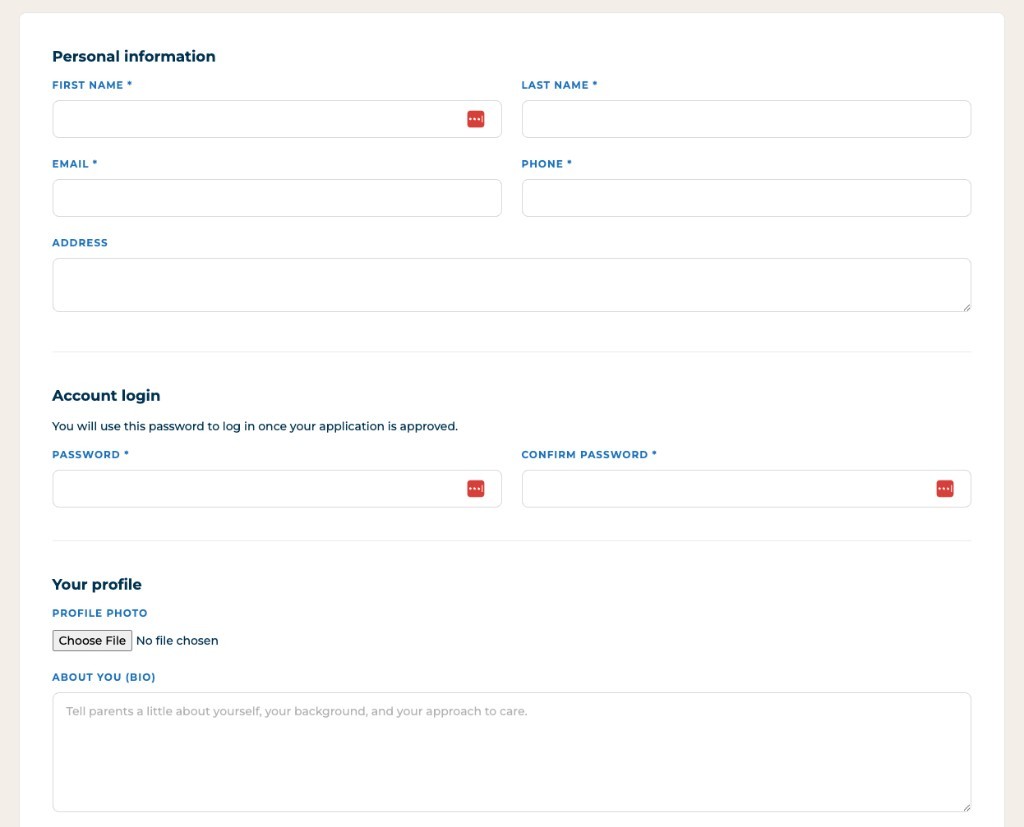
Endeavor provider signup form collecting personal information, account login, and profile details

01

Providers enter and maintain their own information

Service providers can apply directly through the website and submit the information Endeavor needs to review and manage them. Once approved, providers can maintain their availability without office staff copying form submissions and rebuilding provider information manually.
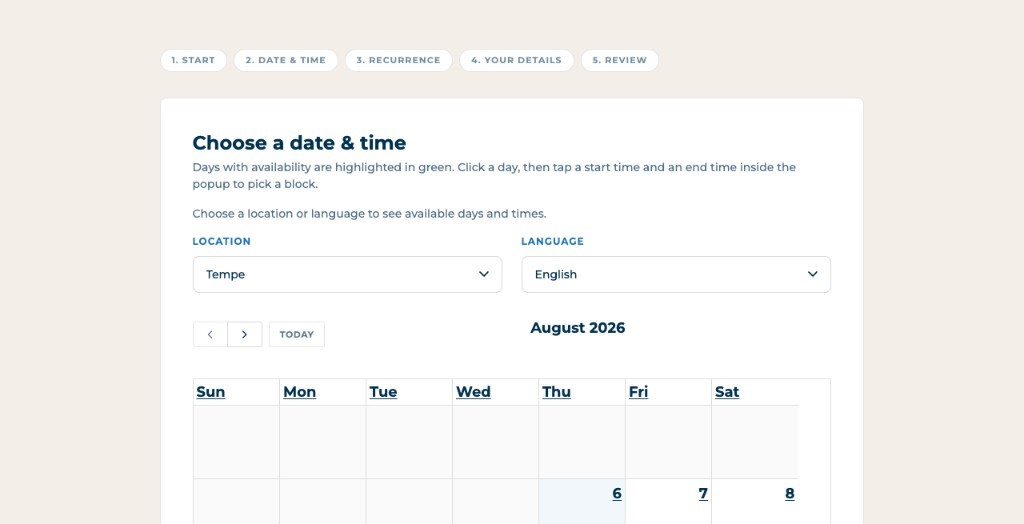
Endeavor family booking interface for choosing a date, time, location, and language availability

02

Families can request services directly online

Parents and guardians can request attendant care, habilitation, or respite through the website instead of beginning every request through the office. They can choose from available service times or request a specific provider they already know.

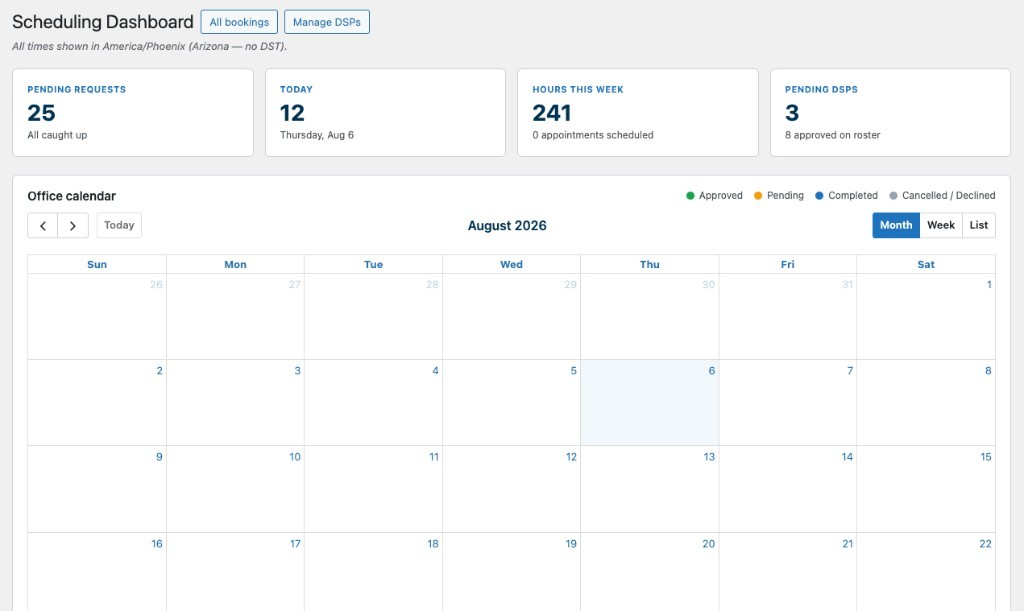
Endeavor office scheduling dashboard with pending requests, weekly hours, and the office calendar

03

The office manages the complete scheduling picture

Endeavor staff can review providers, manage bookings, coordinate schedule changes, and identify open service gaps that still need coverage. The office retains control of the process without manually transferring information between a form, the website, and an unreliable scheduling plugin.

More of the system

Built for everyone involved in delivering care

The platform gives providers, families, and office staff different ways to work with the same provider, availability, request, and booking information.

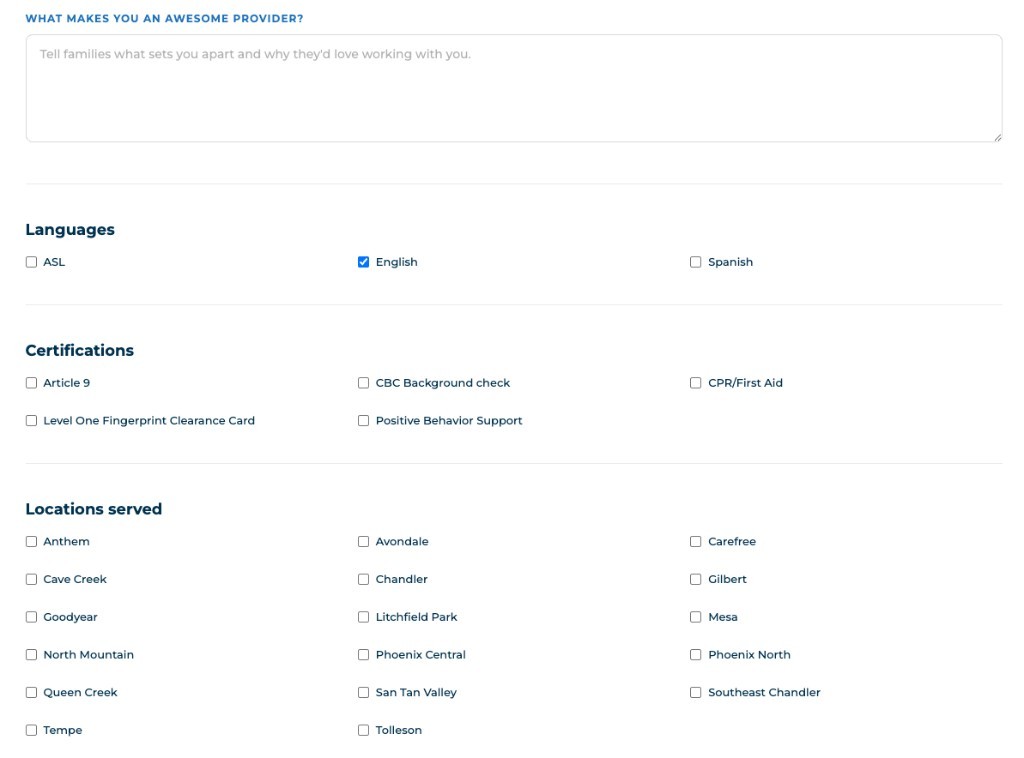
Endeavor provider onboarding form covering provider strengths, languages, certifications, and locations served

Provider Onboarding

Replace the disconnected Google Form

Providers begin directly through the Endeavor website, allowing their information to enter the same system used for approval, availability, scheduling, and ongoing management.

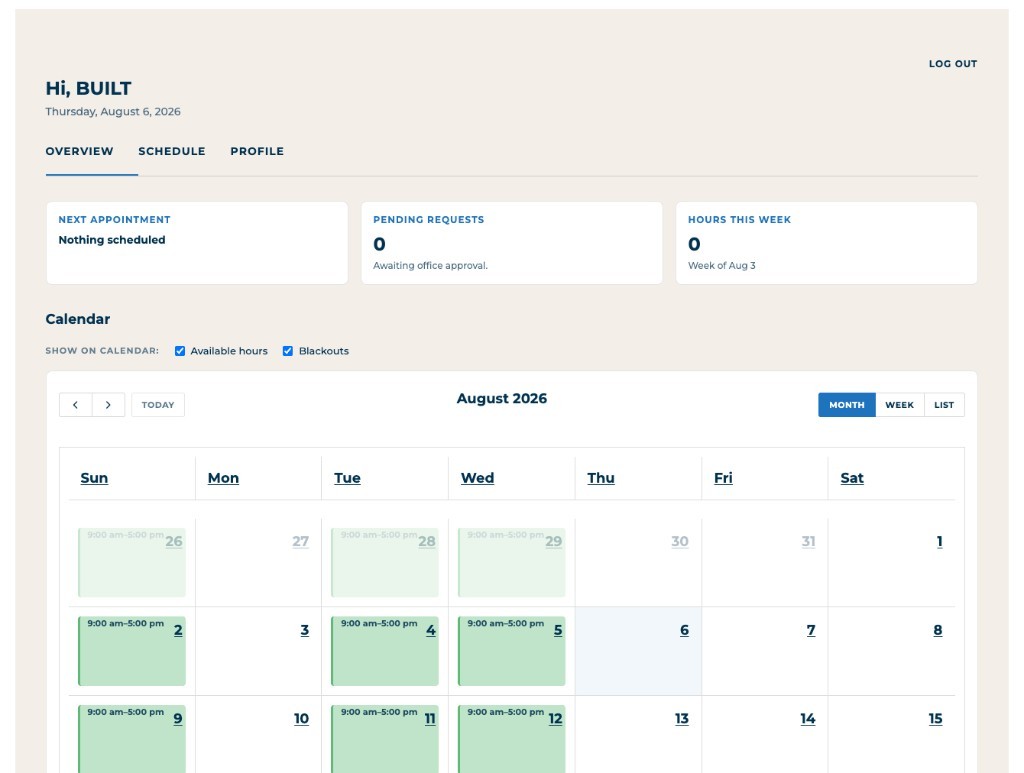
Endeavor provider portal calendar showing available hours and schedule overview

Provider Availability

Let providers maintain when they can work

Approved providers can manage their availability directly so family requests and office scheduling are based on a clearer and more current view of open time.

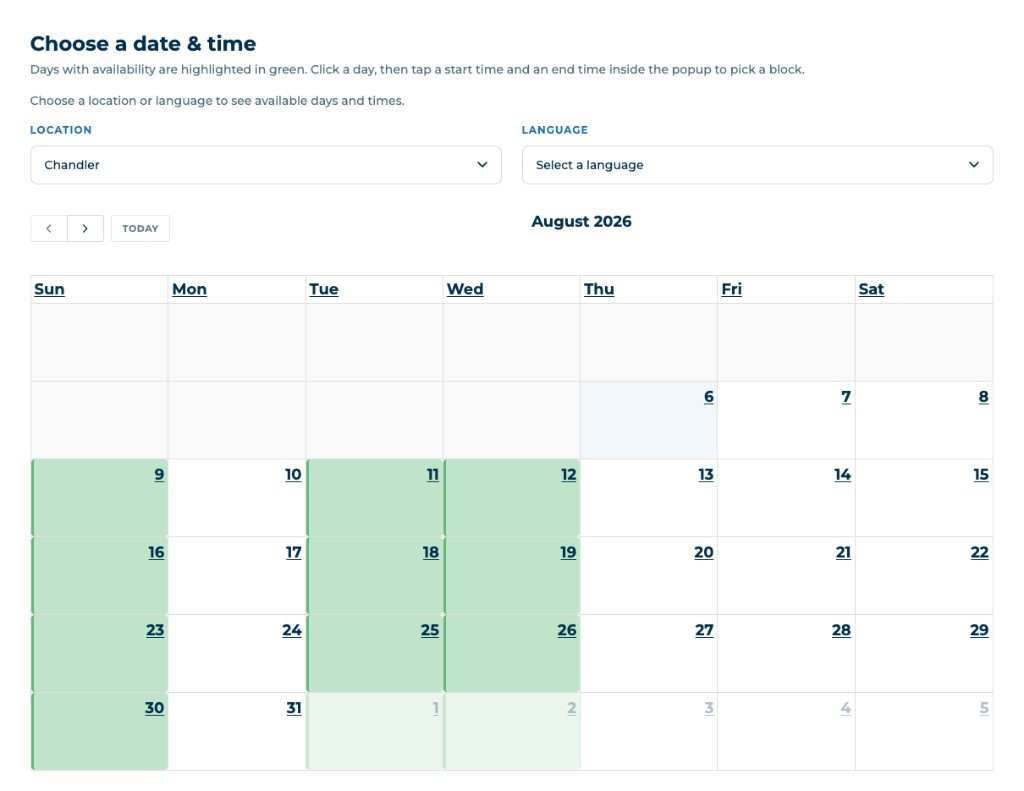
Endeavor family booking calendar for choosing a date and time with location and language filters

Family Requests

Give families a direct path to care

Families can view relevant availability and request the service they need without calling the office to begin every scheduling conversation. They can also request a specific provider when appropriate.

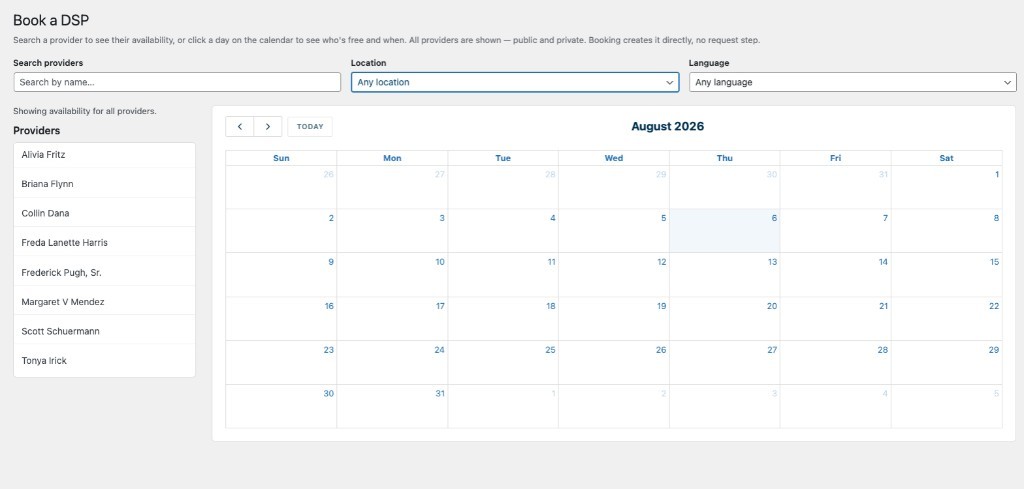
Endeavor office Book a DSP interface listing providers alongside the scheduling calendar

Office Coordination

Manage bookings and fill schedule gaps

Office staff can review providers, requests, confirmed bookings, and open needs, then coordinate changes or schedule coverage where availability has not yet been matched.

The work

Built as one connected service-delivery platform

The public website, provider onboarding, availability, family requests, booking records, and office scheduling tools were designed as one shared system instead of a Google Form, manual website updates, office-only coordination, and a fragile third-party plugin.

  1. Public website
  2. Provider signup
  3. Availability
  4. Family requestsService · Time · Provider
  5. Office scheduling

Product decisions

Replace the workflow, not just the form

The goal was not to recreate the Google Form in a new design. Provider applications, approvals, availability, family requests, and bookings needed to become connected records inside one working platform.

Create direct paths for providers and families

Providers needed to enter and maintain their own information, while families needed a direct way to request services based on availability or provider preference without beginning every request through the office.

Replace a fragile dependency with owned functionality

Scheduling was too central to Endeavor’s operations to depend on a third-party plugin that could take down the website. The custom system gives Endeavor a more stable foundation shaped around its actual process.

What BUILT owned

BUILT designed and developed the Endeavor website and custom scheduling platform, including provider onboarding, approval and publishing, availability management, family requests, booking logic, office scheduling tools, and the replacement of the previous third-party scheduling plugin.

Platform direction

  • Existing Google Form and scheduling-process review
  • Provider, family, and office workflow model
  • Service, availability, and booking architecture

Experience design

  • Public website experience
  • Provider signup and availability interfaces
  • Family request and provider-selection experience

Application engineering

  • Front-end and back-end development
  • Provider, availability, request, and booking logic
  • Office scheduling and gap-management tools

Implementation and support

  • Replacement of the third-party scheduling plugin
  • Production implementation and testing
  • Continued refinement as operations evolve

Because provider signup, availability, family requests, bookings, and office scheduling now live inside one connected platform, Endeavor no longer has to transfer provider data from a Google Form, manually rebuild provider information on the website, or rely on a scheduling plugin that could bring the site down.

Start a conversation

Is a critical service workflow still dependent on forms, manual entry, or an unreliable plugin?

Share how providers, customers, or staff enter the process, where information is being transferred by hand, and which third-party tools have become fragile. BUILT can help replace the disconnected process with one stable website and operational system.